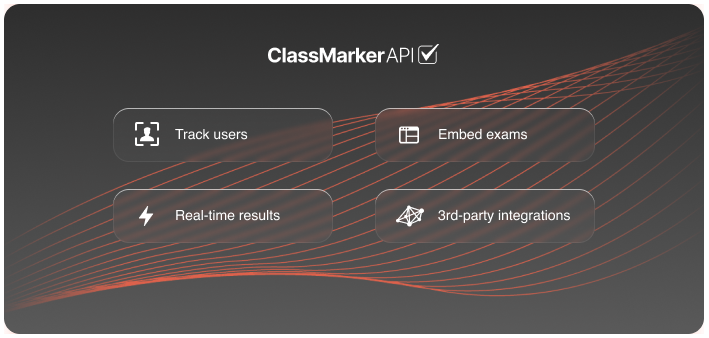
With our API, ClassMarker is the ideal quiz maker for developers.
Use our API to integrate quiz maker with LMS or CRM software, customize your integration and manage your exam data.
Also, our Online Testing API allows you to extract exam results automatically back into your system.
For additional technical information, go to our Developer Documentation.
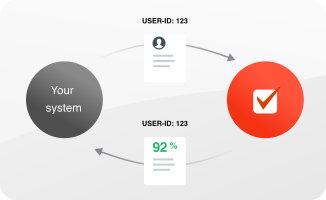
You can integrate the IDs of your test users to be saved with their test results. This allows you to export or send the IDs (along with the test user's test results) back to your own website in real-time.
For additional technical information, go to ClassMarker Integration Documentation.
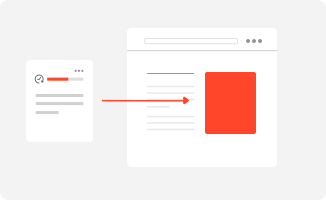
Embed your ClassMarker exams to websites directly to provide a fully integrated solution.
You can customize your exams to perfectly fit the look and feel of your platform as well as fit seamlessly with your platform requirements.
Just some of ClassMarker's powerful features:
For a first look at ClassMarker on your website, add the following SCRIPT embed code to a webpage:
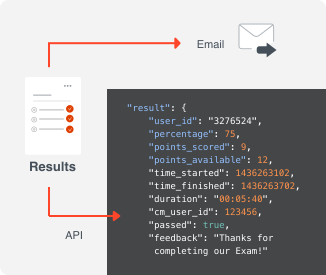
Exam results are sent securely to your website, where you can store them in your database and use them as needed.
Exam results use the cm_user_id parameter you sent to ClassMarker. For example, if this is a user ID from your system, you know who the exam results belong to.
Additionally, you can receive a unique URL to record in your database (one URL per exam result). This allows users to view their test results again in the future.
For more details, see View results URL.
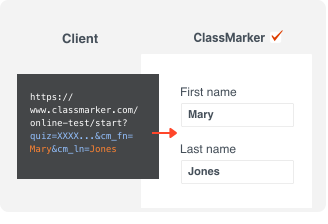
ClassMarker's powerful integration features mean that when you give your test users access to your tests using the access via a link feature, you can send details to ClassMarker, such as name, email address, etc.
Now, these details will be pre-populated when your test users access your test via your link - no need for them to fill their details in before starting their test.
For more details, see Pre-populate user names and emails.
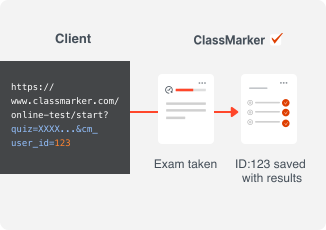
Your users can use their own IDs as if they were logged on to your website.
For more details, see Track user IDs.
User IDs allow you to:
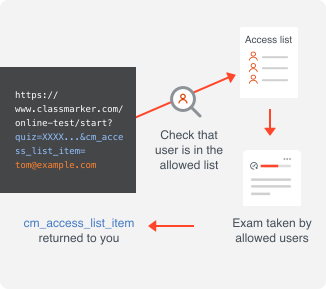
When you give access to your quiz using the access via a link feature, or if you integrate exams on websites, you can opt to restrict access to your exams by creating access lists.
Easily create a list of unique identifiers (e.g., email addresses, employee IDs, etc.) that a user must enter to access your exams. You can also password-protect your exams.
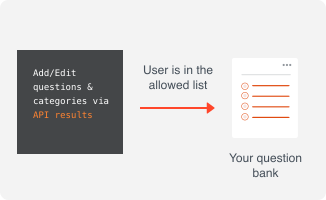
ClassMarker's API lets you read, add, and edit both categories and questions. This allows you to create and approve questions externally before adding them to your account.
Using ClassMarker webhooks, you can send exam results to third-party services.
https://zapier.com can receive webhook data from ClassMarker and send exam results to a third-party service of your choice.
Here are some examples of how third-party systems can leverage ClassMarker data:
View our step-by-step tutorials to discover more about ClassMarker's API & Integrations
and enjoy advanced features that make your exams work hard for you.
API stands for application programming interface. It enables two or more programs to communicate with each other.
APIs make your life easier. You're likely using software and platforms like LMS, CRM, recruitment portal, WordPress website, etc. You can use ClassMarker's API to integrate and share data with your existing platforms.
For example, you can use our API to send details of your test user's name, email address, or other identifiers.
When your test users access your exams using the link you provided, these identifiers will be pre-populated - no need for them to fill their details in before starting their test, reducing human error.
A webhook is a way for one software to deliver real-time data to another software.
For example, you can use our webhooks to extract exam results automatically back into your system, reducing time and the chance of human error copying results in yourself.
Absolutely! Create a Free trial account now and get 30 days to make an unlimited number of tests.
Registration is easy and takes less than a minute. Plus, no credit card details are necessary!
