ClassMarker's easy-to-use Online Quiz maker software allows you to select any combination of settings to suit your Online Testing requirements.
ClassMarker is flexible and allows you to update Exam settings at any time to change how Exams are taken.
Review some of the custom settings available to you. Give Exams online, with the control you require.
Dates and times will apply to your timezone.Tip
mm/dd/yyyyIf you are required to include TAX information, use the
TAX Details field.
Note: TAX should be "included" in the Price you set.
Example: Inc 10% TAX
This will display with the price, and in the PDF Receipt if you are giving Receipts via ClassMarker.
This is the Paypal email address that payments will be sent to.
The email address you select here must be registered with a Verified PayPal Premier or Business account, otherwise payment will not be accepted by PayPal and your Test cannot be taken.
You can add a new email address to select here via your My account page, see the Add Emails section.
These instructions are seen when Test takers first go to this
Link and see the Price you have set.
(These instructions are only displayed
if you are charging for this Test).
 Tip
Tip
You can always download receipts from your Test takers results page if you wish to send them out later.
You can also allow Test takers to download their receipt after paying.
Receipts will display:
1. Your Logo (Select below)
2. Your organizations details (Add above)
3. The Price (and Tax information, Set above) and Date
4. The purchase description (Set below)
5. The Tests takers Name and Email
6. Invoice ID from Paypal
Download a sample PDF Receipt
Tip

Guidelines will reflect your chosen settings.
This Test:
| * Will allow you to save and finish at a later date |
| * Has a time limit of 20 minutes |
| * Will not allow you to go back and change your answers |
| * Will finish if you get any Questions incorrect |
| * Has a pass mark of 85% |
Themes can be used to brand your Tests (with logo and/or colors).
Pass Mark & Feedback are optional
% Tip
Instructor Email Settings
Have results emailed to Instructor
Test Taker Email Settings
Email results to Test Takers Tip
More settings are available when you are logged in.
View Screenshots in our User Manual.
Back to topAll Questions you save in ClassMarker are stored in your Question bank.
This means you can:
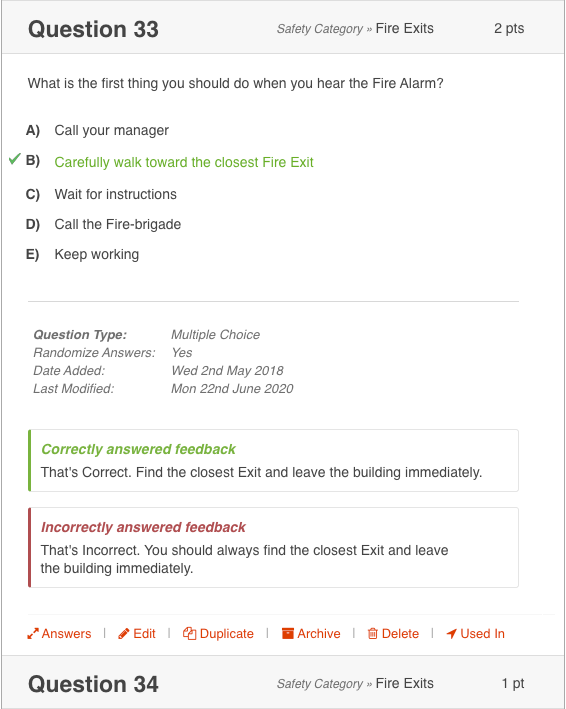
Professionally format your Tests introduction, Questions and Feedback using our Rich Text Editor. You can also upload files, images, video and audio, along with links to external websites and resources such as PowerPointTM documents. You can also Embed YouTube and, Vimeo and Soundcloud files directly into your Questions.
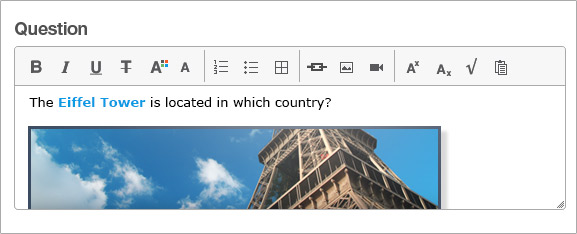
View Multiple Choice Question Editor
Back to topNot only do you have full control over how a Test is taken, but you can re-assign the same test to be taken by different groups of users with completely different settings each time. For example: You could set a different time limit for Group A and change the level of feedback shown for Group B.
You can also save time by defining preferred settings which can automatically be applied by default each time you assign a Test to be taken.
Back to top
ClassMarker's online-testing system works across all major operating systems, web browsers and devices. There are no software installations required and our Test taker's interface has been built to meet 508 compliance, working with both screen readers and magnifiers. Teachers, Schools, Universities and Businesses can easily create Exams and Quizzes with our online assessment tool which can be taken by their students across all popular platforms.
Yes, you have full control over the settings you chose for each of your exams.
Yes, you can create your own custom questions for your online exams.
ClassMarker gives you multiple options to control access to your exams:
Yes, you can have test takers return to your own website URLs based on a pass or fail result.
For a full list of FAQs, go to our FAQ page.
Back to topand create your first custom exams today - no credit card required.
